
Pc Optimization screenshots
About Pc Optimization
Pc Optimization is a free Tools program for Windows PCs, available to download on URX LABS.
The latest version is v1.0, a 0.5 MB download, updated on Nov 8, 2026. You can download the installer directly from this page — no account or sign-up needed.
Pc Optimization contains no ads.
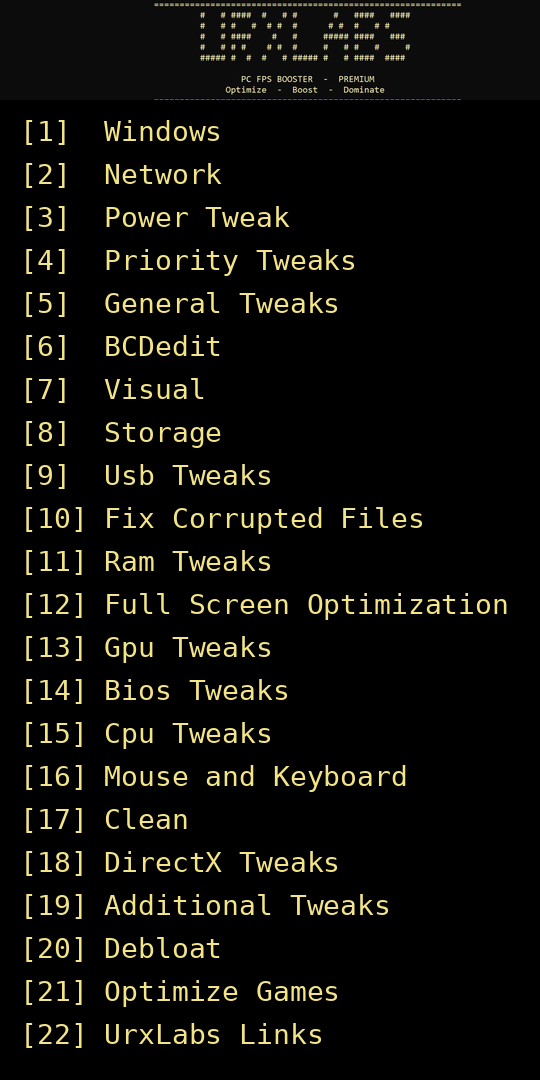
Download Pc Optimization v1.0 for Windows from URX LABS — a free FPS booster with 21 one-click tweaks for smoother gaming with less lag and stutter. No ads. Pc Optimization by UrxLabs is a free FPS booster for Windows PC. Open the menu, pick a number and the tweak runs — 21 options in one place: Windows, Network, Power, Priority, General, BCDedit, Visual, Storage, USB, Fix Corrupted Files, RAM, Full Screen Optimization, GPU, BIOS, CPU, Mouse and Keyboard, Clean, DirectX, Additional Tweaks, Debloat and Optimize Games. It also has UrxLabs Links (option 22) for the UrxLabs website and WhatsApp channel. No ads, no installer and no account — just download the file, right-click it and choose Run as administrator, then pick your tweaks from the menu. Made for Windows 10 and Windows 11. Tip: make a Windows System Restore point before running tweaks, so you can roll back any change.
App info
- Name
- Pc Optimization
- Available on
- URX LABS
- Category
- Tools
- Platform
- Windows
- Version
- 1.0
- Size
- 0.5 MB
- Updated
- Nov 8, 2026
- Released
- Nov 8, 2026
- Price
- Free
- Ads
- No ads
How to install Pc Optimization
- Tap Install and wait for the installer to download.
- Open the file from your Downloads folder.
- If Windows SmartScreen appears, choose More info → Run anyway.
- Follow the setup steps, then open the program from the Start menu.
Pc Optimization — questions
Is Pc Optimization free?
Yes, it is completely free. There are no ads, no account and no payment inside.
What is the latest version of Pc Optimization?
The latest version is v1.0, updated on Nov 8, 2026. The download size is 0.5 MB.
How do I run Pc Optimization?
Download the file, right-click it and choose Run as administrator, then type the number of the tweak you want from the menu.
Will Pc Optimization increase my FPS?
It applies system and game tweaks that reduce lag and stutter. How much FPS improves depends on your PC and the game.
Is Pc Optimization safe?
It only runs the tweaks you pick from the menu, and nothing is uploaded anywhere. Still, make a System Restore point first so you can undo any change.
Can I undo a tweak?
There is no built-in undo in the tool, so make a Windows System Restore point before running it — that is the way to roll back.
Do I need to install anything?
No. There is no installer — it is a single file you run directly.
What is UrxLabs Links in the menu?
Option [22] in the menu opens the UrxLabs website and WhatsApp channel.
More apps like Pc Optimization
 Urx Voice OverDownload Urx Voice Over for Windows from URX LABS. This free voice recorder creates…Tools · Windows · v1.0View
 Urban VPN ProDownload Urban VPN Pro for Android from URX LABS. This free, fast VPN protects your…Tools · Android · v2.2.4 · 13 MBView
 Green Cloner ProDownload Green Cloner Pro for Android from URX LABS. This free app cloner runs multiple…Tools · Android · v1.1.0 · 11.5 MBView
 FSOS iosDownload FSOS ios for Windows from URX LABS. This free custom Windows 11 setup optimises…Windows · Windows · v1.0 · 4.5 GBView
 Red MovieBox 1028Red MovieBox 1028 is the latest version 4.0.03.1028.03 of the modded MovieBox app for…Films & Video · Android · v4.0.03.1028.03 · 82.2 MBView
 YouTube ProYouTube Pro is the URX LABS version of YouTube for Android (version 21.42.243). It runs…Films & Video · Android · v21.42.243 · 210.3 MBView